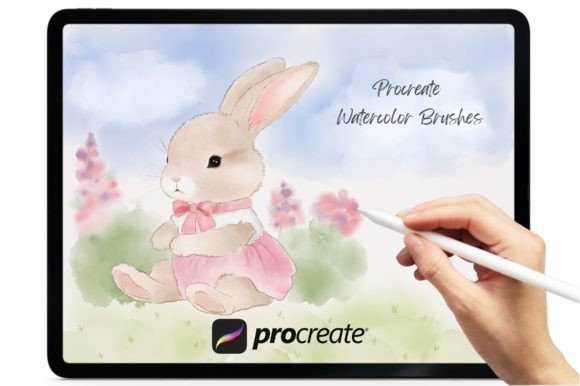
Procreate Watercolor Brush V.3
Unleash Creative Possibilities with Watercolor Magic
The Procreate Watercolor Brush V.3 is a powerful brushset designed for iOS users running Procreate version 5.0 and higher. With its rich collection of watercolor effects, this brushset offers a versatile toolkit for illustrators, designers, and creative professionals looking to add depth, texture, and organic beauty to their digital work. Whether you're crafting greeting cards, logos, wedding stationery, or social media graphics, the V.3 brushset brings a natural, painterly touch to every design.
What’s Included in the Brushset?
This curated brushset comes with a total of 18 brushes across three categories:
- 12 Watercolor Brushes for layering, shading, and soft washes
- 3 Watercolor Blender Brushes to smooth transitions and blend colors seamlessly
- 3 Texture Brushes (bonus) to add depth, grit, or background interest
Each brush is optimized for Procreate’s engine, giving you control over opacity, flow, and grain to create effects that mimic traditional watercolor techniques—without the mess.
Design Projects That Shine with Watercolor V.3
One of the most exciting aspects of the Procreate Watercolor Brush V.3 is its flexibility across creative formats. Here are a few project ideas to spark inspiration:
- Greeting Cards: Use soft washes and layered color to create hand-painted card designs that feel personal and elegant.
- Logo Concepts: Add subtle texture and organic edges to brand assets for a more artisanal, hand-crafted feel.
- Social Media Graphics: Stand out with soft backgrounds, watercolor dividers, or illustrated quote templates.
- Wedding Stationery: From invitations to thank-you notes, the V.3 brushes lend a romantic, timeless quality.
- Quote Art: Pair flowing brushstrokes with meaningful text to create shareable, printable quote designs.
Because the brushes are built for Procreate, they work beautifully with layers, clipping masks, and blending modes—making it easy to build complex compositions without sacrificing performance.
How Different Users Can Benefit
The Procreate Watercolor Brush V.3 isn’t just for illustrators. Here’s how various creators can integrate these brushes into their workflow:
- Bloggers & Content Creators: Design custom quote graphics, headers, or Pinterest pins that match your brand aesthetic.
- Freelancers: Offer clients hand-painted textures or watercolor-style illustrations as part of design packages.
- Educators: Create engaging visual aids or printable worksheets with a soft, approachable look.
- Small Business Owners: Design packaging, social media assets, or product mockups with a unique, artisanal edge.
- Hobbyists: Enjoy experimenting with digital painting without needing physical materials.
Each user can adapt the brushset to their own creative voice—whether that’s minimalist, whimsical, modern, or vintage-inspired.
Getting the Most from Your Watercolor Experience
While the Procreate Watercolor Brush V.3 is intuitive, a few best practices can help you make the most of its capabilities:
- Work in Layers: Separate your background washes, details, and textures onto different layers for better control and editing flexibility.
- Use Light to Dark: Like traditional watercolor, start with lighter tones and gradually build up darker areas.
- Experiment with Opacity: Lower opacity settings can help you create soft gradients and blended effects.
- Save Custom Palettes: Stick to a consistent color scheme to maintain cohesion across your designs.
- Test Before Exporting: Zoom in and out to ensure clarity and avoid muddy blends in your final artwork.
By combining these techniques with the brushset’s natural flow and texture, you can create polished, professional results that feel both digital and handcrafted.
Staying Organized and Consistent
If you're creating multiple designs or working on a series (like a set of greeting cards or social media posts), consistency is key. Here’s how to stay organized:
- Label Layers Clearly: Name your layers based on content (e.g., "background wash," "text outline") for easy navigation.
- Reuse Layouts: Duplicate canvases to maintain uniformity in spacing, fonts, and visual hierarchy.
- Save Brush Presets: If you tweak brush settings, save them as custom brushes for future use.
- Export Strategically: Choose the right resolution and file format depending on the platform or print use.
These habits help streamline your workflow and ensure your designs look cohesive, especially when sharing across platforms or clients.
Real-World Examples and Practical Inspiration
Let’s look at how some creators have used the Procreate Watercolor Brush V.3 in real projects:
- A blogger created a set of seasonal quote graphics using soft watercolor backgrounds and bold typography, enhancing engagement on Instagram and Pinterest.
- A stationery designer developed a line of digital wedding invitations, using the blender brushes to create seamless color transitions and elegant floral motifs.
- A small business owner designed custom thank-you cards for clients, adding a subtle watercolor texture to the background for a refined, personal touch.
These examples show how the brushset can be adapted to different niches and creative goals—proving that you don’t need advanced painting skills to create beautiful, professional results.
Why This Brushset Stands Out
Compared to generic watercolor brushes, the Procreate Watercolor Brush V.3 is crafted with attention to texture, blending, and responsiveness. The inclusion of texture brushes as a bonus adds another layer of creative control, allowing you to simulate paper grain, canvas, or vintage paper effects. And because it’s specifically built for Procreate, it integrates smoothly with the app’s features like pressure sensitivity, brush dynamics, and animation assist.
It’s also a great option for creators who want to explore digital watercolor without investing in physical materials. Whether you're a seasoned designer or a beginner, the brushset opens the door to expressive, hand-painted visuals that resonate with your audience.