Procreate Realistic Canvas Brush: Elevating Digital Art with Authentic Texture
Understanding the Procreate Realistic Canvas Brush
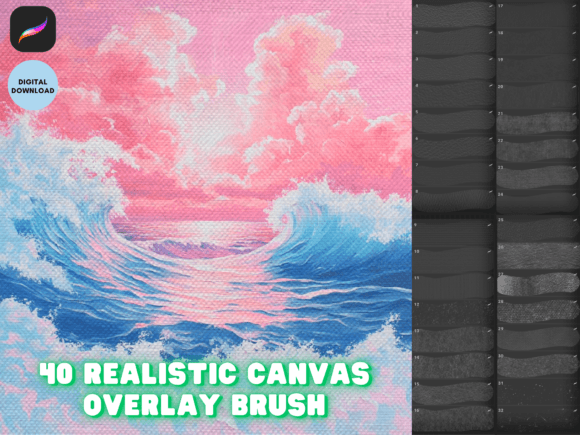
The Procreate Realistic Canvas Brush is a digital brush set designed to replicate the tactile feel of traditional canvas painting within the Procreate app. It allows digital artists to apply strokes that mimic the grain, resistance, and visual depth of real canvas surfaces. This brush set includes 40 distinct brushes, each calibrated to provide a unique interaction between brush and surface, helping artists achieve a more organic and handcrafted aesthetic.
What sets the Procreate Realistic Canvas Brush apart is its attention to texture detail and responsiveness. Unlike generic brushes that may feel flat or overly smooth, these brushes introduce subtle imperfections and grain that mirror the behavior of physical media like oil or acrylic on canvas. The included seamless canvas overlay brushes further enhance this realism by allowing users to apply textures over finished illustrations without disrupting the underlying artwork.
Installation and Setup
After purchasing the brush set, users receive a direct download link. To install the Procreate Realistic Canvas Brush, open the link on your iPad and select the .brushset file. Choose "Open With Procreate," and the brushes will be automatically added to your brush library. This streamlined process ensures minimal setup time and immediate access to enhanced texture tools.
For those new to Procreate or digital brushes in general, the installation is user-friendly and doesn't require additional software or technical knowledge. The brushes are ready to use upon import, allowing artists to focus more on creation than configuration.
How It Stands Out Among Digital Brush Options
When compared to standard Procreate brushes or other downloadable brush sets, the Procreate Realistic Canvas Brush excels in simulating physical media. Many digital brushes prioritize smoothness and precision, which can result in a sterile or overly clean appearance. This brush set, however, embraces the irregularities of real-world painting, making it a preferred choice for illustrators aiming to blend digital convenience with traditional aesthetics.
- Texture depth: Offers a more nuanced surface interaction than basic texture brushes.
- Variety: 40 unique brushes allow for diverse applications—from dry brush effects to heavy impasto strokes.
- Overlay function: The seamless canvas overlay brushes enable texture application without altering original brushwork.
Other brush sets may focus on specific styles, such as watercolor or ink, but the Procreate Realistic Canvas Brush fills a niche for artists who want their digital work to resemble oil or acrylic paintings on canvas without switching to physical media.
Strengths and Limitations
One of the main strengths of the Procreate Realistic Canvas Brush is its ability to enhance the perceived depth and authenticity of digital illustrations. Artists who work in styles that benefit from a tactile surface—such as portrait painting, still life, or expressive brushwork—will find these brushes especially useful. The overlay brushes also allow for non-destructive texturing, preserving the integrity of the original artwork.
However, this brush set may not be ideal for all types of digital illustration. For instance, artists working in clean line art, flat design, or vector-style illustration may find the textures distracting or unnecessary. Additionally, because the brushes simulate physical resistance, they may require a learning curve for users accustomed to smooth, pressure-sensitive digital brushes.
Best Use Cases
The Procreate Realistic Canvas Brush shines in applications where realism and texture are key. Consider using it when:
- Creating fine art reproductions: Simulate the look and feel of oil or acrylic paintings for digital galleries or print sales.
- Enhancing portfolio pieces: Add depth to your illustrations to stand out in creative portfolios or client presentations.
- Exploring traditional aesthetics: Transitioning from physical to digital media? These brushes help maintain the familiar resistance and texture you're used to.
For example, a digital painter working on a portrait commission may use the heavier brushes to build up textured highlights on clothing or skin, while applying a subtle canvas overlay to unify the piece. In contrast, someone designing a logo or infographic would likely find these brushes too textured and opt for smoother alternatives.
Comparing Alternatives
There are several digital brush options available for texture and realism, but the Procreate Realistic Canvas Brush offers a balanced combination of variety and authenticity. Some free brush sets may provide a few canvas-like options, but they often lack the depth and responsiveness of this curated set. On the other hand, premium brush packs focused on specific media (like watercolor or gouache) may offer more specialized tools but fall short in simulating canvas texture.
For artists who want a hybrid approach, combining the Procreate Realistic Canvas Brush with other brush sets can yield compelling results. For instance, using a textured canvas base with smooth overlay brushes for fine details allows for both realism and control. This flexibility makes the brush set a versatile addition to any digital artist’s toolkit.
Decision Factors
When deciding whether the Procreate Realistic Canvas Brush is the right choice, consider the following:
- Artistic style: Do you prefer textured, painterly work over clean or flat design?
- Output goals: Are you creating for print, portfolio, or sale where a physical aesthetic is desirable?
- Workflow preferences: Do you want to simulate traditional media without the mess and cost of physical supplies?
If your answer to these questions is "yes," then this brush set is likely a strong fit. However, if you primarily work in minimalist or vector-style illustration, or if you prefer digital tools that emphasize precision over texture, you may find other brush sets more suitable.
Final Thoughts
The Procreate Realistic Canvas Brush is a well-crafted tool for digital artists seeking to infuse their work with the visual and tactile qualities of traditional canvas painting. Its 40 brushes offer a wide range of expressive possibilities, and the seamless overlay brushes provide a non-destructive way to enhance texture without compromising original brushwork.
While it may not be the best fit for every artist or every project, it stands out as a thoughtful and effective option for those who value the look and feel of real canvas in a digital environment. Whether you're transitioning from physical to digital media or simply looking to expand your creative toolkit, the Procreate Realistic Canvas Brush offers a practical and accessible way to elevate your illustrations.