16 Ribbon Embroidery Brush Patterns: A Practical Design Resource for Creative Workflows
Designers, illustrators, and digital artists often seek tools that streamline their creative process while maintaining a high level of visual appeal. The 16 Ribbon Embroidery Brush Patterns package offers a versatile set of assets designed for use in Adobe Illustrator and Photoshop. Whether you're crafting digital illustrations, preparing print materials, or designing embroidered elements for physical products, these patterns can integrate smoothly into your existing workflow.
Understanding the 16 Ribbon Embroidery Brush Patterns Package
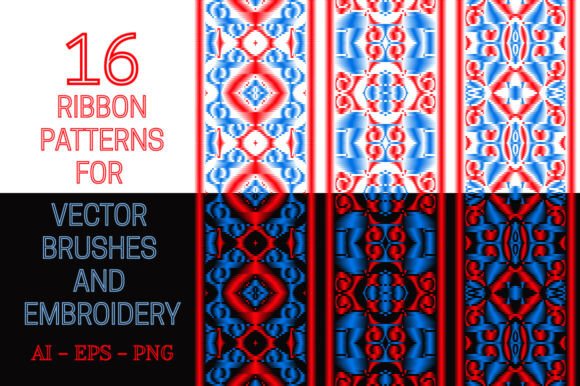
This collection includes 16 distinct ribbon-inspired patterns, each available in multiple file formats: AI for Illustrator CS6 users, EPS for compatibility with earlier Illustrator versions, and high-resolution PNG files (2000x2440 pixels) with transparent backgrounds for use in Photoshop. The patterns are initially designed in red and blue but can be easily recolored using standard tools in your preferred software.
Each pattern serves a dual purpose: as a vector brush for creating consistent strokes and borders in Illustrator, or as a ready-to-use design element in Photoshop. This flexibility makes the package valuable for both digital and print-based creative professionals.
How Ribbon Embroidery Patterns Fit Into Design Workflows
Before diving into a project, it's important to understand how such a resource can support your creative process. The 16 Ribbon Embroidery Brush Patterns are particularly useful in scenarios where decorative borders, stylized strokes, or embroidered textures are needed. They can be used during the design phase to add visual interest or as part of post-processing to enhance final outputs.
- Pre-Production: Use the patterns to mock up design elements before committing to final artwork.
- Production: Apply them directly as vector brushes or layered PNG textures during the creation of digital assets.
- Post-Production: Enhance finished designs with refined borders, frames, or overlay textures for print or web use.
Integration with Adobe Illustrator
For Illustrator users, the AI files are ready-made for creating pattern brushes that maintain consistency across curved or straight paths. This is especially useful when designing frames, borders, or embellishments that need to follow specific contours without distortion.
For those using older versions of Illustrator, the EPS files allow you to manually create custom brushes by defining patterns. This process, while slightly more involved, ensures backward compatibility and gives you control over how each brush behaves in different design contexts.
Using Ribbon Patterns in Photoshop
The PNG files included in the package are ideal for Photoshop users who want to apply ribbon textures or embroidered elements as overlays. With transparent backgrounds, they can be layered over other textures or background designs without the need for additional masking.
These files are especially useful for:
- Creating digital scrapbook elements
- Designing themed invitations or greeting cards
- Adding texture to web banners or social media graphics
Customization and Adaptability
One of the key strengths of this pattern set is its adaptability. While the base color scheme is red and blue, both Illustrator and Photoshop offer straightforward methods to recolor these elements. In Illustrator, you can adjust the color of vector brushes using the Recolor Artwork feature. In Photoshop, you can apply adjustment layers or blending modes to seamlessly integrate the ribbon patterns into your color scheme.
This flexibility ensures that the patterns can be used across a wide range of projects—from branding materials to personal art pieces—without being visually restrictive.
Practical Use Cases Across Creative Fields
The 16 Ribbon Embroidery Brush Patterns are not limited to a single industry or application. Here are a few examples of how different professionals might integrate them into their workflows:
- Graphic Designers: Use ribbon brushes to create elegant borders for certificates, awards, or promotional materials.
- Illustrators: Incorporate ribbon textures into character designs or background elements for a stylized look.
- Web Designers: Apply PNG overlays as decorative elements in UI components or section dividers.
- Entrepreneurs: Add professional embellishments to product packaging mockups or branded merchandise designs.
- Educators: Use the patterns in classroom materials or digital presentations to create engaging visual layouts.
Compatibility and File Management
Ensuring compatibility with your software version is a key step in using this package effectively. Illustrator CS6 users will benefit from direct support for pattern brushes, while those with earlier versions can still utilize the EPS files by creating custom brushes manually. Photoshop users should note that while the PNG files are ready to use, organizing them into a preset brush library can streamline future access.
For long-term use, it's recommended to:
- Organize pattern files into clearly labeled folders
- Backup brush libraries and presets
- Create a swatch or sample sheet for quick reference
Efficiency and Consistency in Design
Using pre-made brushes and textures like the 16 Ribbon Embroidery Brush Patterns can significantly reduce the time spent on repetitive design elements. Instead of manually drawing or masking each ribbon, you can apply a brush or overlay and adjust it with minimal effort.
This efficiency is especially valuable when working on large-scale projects or when consistency across multiple design assets is crucial—such as in branding kits, template sets, or multi-page documents.
Quality Control and Long-Term Use
High-resolution files and scalable vector formats ensure that the patterns maintain quality across various applications. The 2000x2440 pixel PNGs are suitable for both screen and print, while the vector AI and EPS files scale without loss of clarity.
To maintain quality over time:
- Keep original files archived in a safe location
- Use non-destructive editing techniques when applying textures
- Periodically test brush performance across updated software versions
Conclusion: A Seamless Addition to Your Creative Toolkit
The 16 Ribbon Embroidery Brush Patterns provide a practical, adaptable solution for designers and creators who want to enhance their projects with elegant, textured elements. Whether used in Illustrator for vector-based illustrations or in Photoshop for layered compositions, this package supports a streamlined workflow while offering flexibility in customization and application.
By integrating these patterns into your design process, you can reduce repetitive work, maintain visual consistency, and elevate the aesthetic quality of your outputs—all while staying efficient and focused on the creative task at hand.